Database Schema Drift Starts With One Manual ALTER
It’s 2 a.m. and checkout is timing out. Someone finds the slow query, adds an index on production by hand, and the graphs go green. Nobody writes a migration for it. Three weeks later a deploy runs a migration that drops and rebuilds that table, the index is gone, and checkout times out again. Or the other way round: a hotfix makes a column NOT NULL on production only, and the next release, which was tested against staging, fails every insert that leaves it empty.
That’s schema drift. The database no longer matches what the code and the migrations say it is, and nothing tells you. Migration tools know what they applied. They don’t look at what’s actually there.
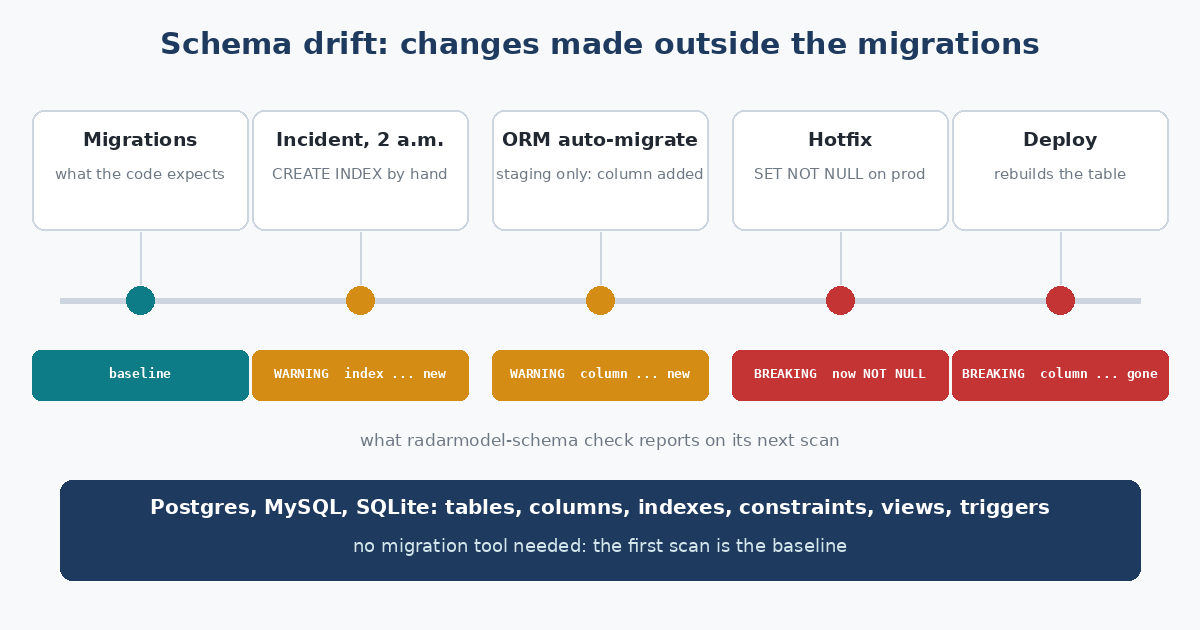
Every change outside a migration is drift, whoever made it and for whatever good reason.
Read what’s there, compare, say what moved
RadarModel Schema does for databases what RadarModel AI does for model lists. It reads the live schema of a Postgres, MySQL or SQLite database: tables, views, columns with their types, nullability and defaults, indexes, constraints and triggers. It keeps the snapshot. Next time it reads again and compares.
You don’t have to adopt a migration tool to use it, or change how you deploy. Point it at a database and the first scan becomes the baseline. From then on a dropped column, a changed type or a new NOT NULL is breaking, a new index or a changed default is a warning, and a column that moved position is info. Ignore rules keep temp tables and scratch schemas out of it.
There are two ways to use the baseline. Rolling compares each scan with the one before, so every change is reported once. Pinned compares every scan with a schema you accepted, so drift keeps showing up until someone looks at it and runs accept. And diff compares two databases right now, staging against production, which is often the question people actually have.
No false drops
A drift detector that cries wolf is muted by Friday. So the failures that look like drift are treated as failures. A lost connection, a wrong password, a SQLite file that moved, a scan that took too long: the database is reported as “couldn’t scan”, and the stored snapshot stays as it was.
Some cases needed more than that. MySQL’s information_schema only lists what the user is allowed to see, so revoking a privilege makes tables and triggers vanish from it. Before reporting anything as dropped, RadarModel Schema asks MySQL about it directly: “doesn’t exist” is a drop, “access denied” is a failed scan. Postgres is read from pg_catalog, which lists everything regardless of privileges, so there the question never comes up. Postgres does print names differently depending on the session’s search_path, though, so every read sets its own. And a migration that runs while the scan is reading could leave a half-changed picture, so every scan reads the schema twice and only accepts two reads that agree. How it was tested
Same engine, same alerts, same exit codes as RadarModel AI. check exits 1 on a breaking change, which makes it a reasonable thing to run before a deploy. Start with the quick start.